AI is a remarkable design partner for jewelers, but it isn't a mind reader, and it isn't a jeweler. It amplifies what you bring to it. Designers with a clear point of view, strong references, and real craft knowledge get results that carry their signature. Without that direction, results drift toward the generic.
That's why we think it's worth being honest about where AI still struggles with jewelry. Every challenge has a workaround, and each one comes back to the same idea: your judgment leads.
Why jewelry is hard for AI
Jewelry lives in the details. A prong that's a millimeter too thick, a stone tilted the wrong way, or a setting that couldn't actually hold its stone can change a piece entirely. General image tools are trained on everything from landscapes to coffee cups, so they're very good at making something look beautiful. They aren't built to understand how a piece is worn, how it's constructed, or why a cantilever setting is not the same thing as a bezel.
AI also doesn't edit an image the way design software does. Each generation redraws the piece, so anything you don't clearly guide is open to reinterpretation. In Facet Flow, we've built jewelry-specific logic into the backend to handle much of this, so you don't have to. But when it still gets something wrong, the workarounds below will help you steer it back.
Where AI gets it wrong, and how to work around it
1. Unusual settings
AI has seen far more four-prong solitaires than two-prong or cantilever settings. When it's unsure, it falls back on what's familiar, even when you've asked for something else.
We saw this firsthand, starting with this prompt:
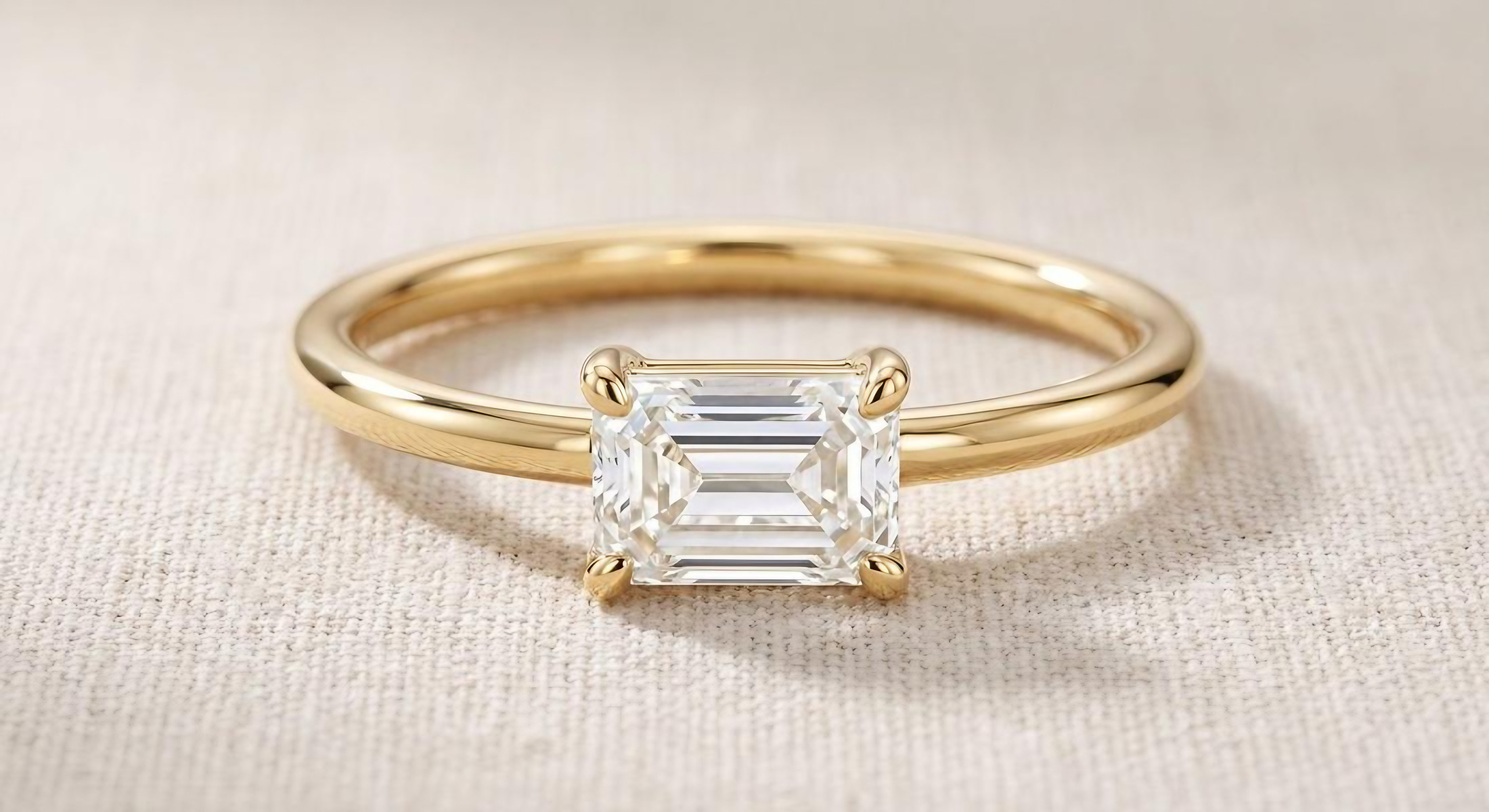
Design a yellow gold solitaire ring with an elongated emerald-cut diamond set east-west in a two-prong setting, with one prong at each short end of the stone. Slim, polished, round band. Minimal and modern.
The result was great: the metal, stone, orientation, and slim band were all right. But it came back with four prongs.
So we asked for the change directly:
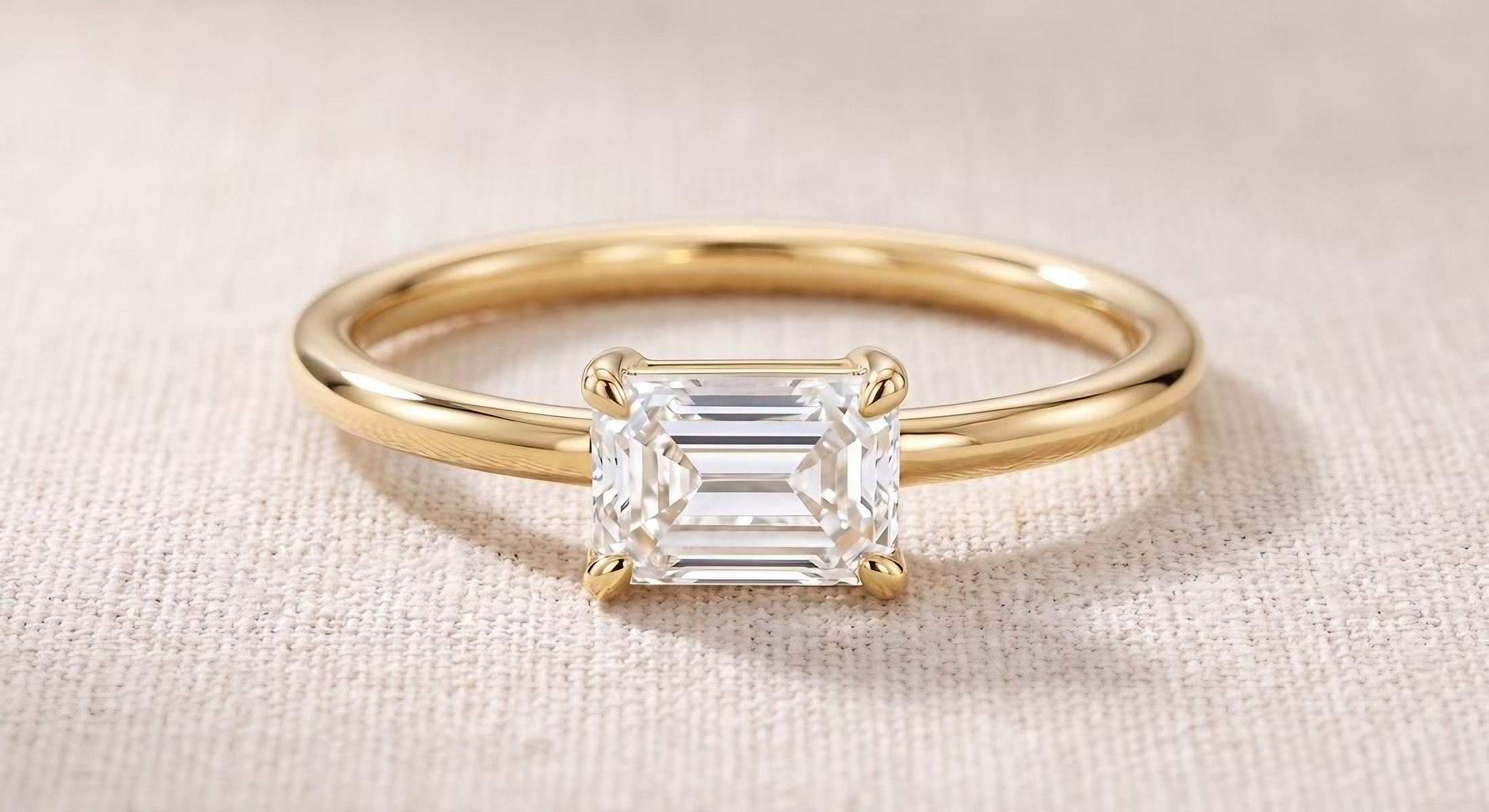
Change the setting to a two-prong setting. Remove the four corner prongs and replace them with two single prongs, one centered on each short end of the emerald-cut diamond, so the long sides of the stone are completely open. Keep the stone, band, metal, and background exactly the same. Do not change anything else in the image.
The image came back virtually unchanged. That's partly by design. Behind the scenes, Facet Flow prioritizes keeping the stone secure, and two small prongs on an elongated stone can read as a risky setting. So the four prongs stayed.
Then we stopped relying on the name of the setting and described the metal itself:
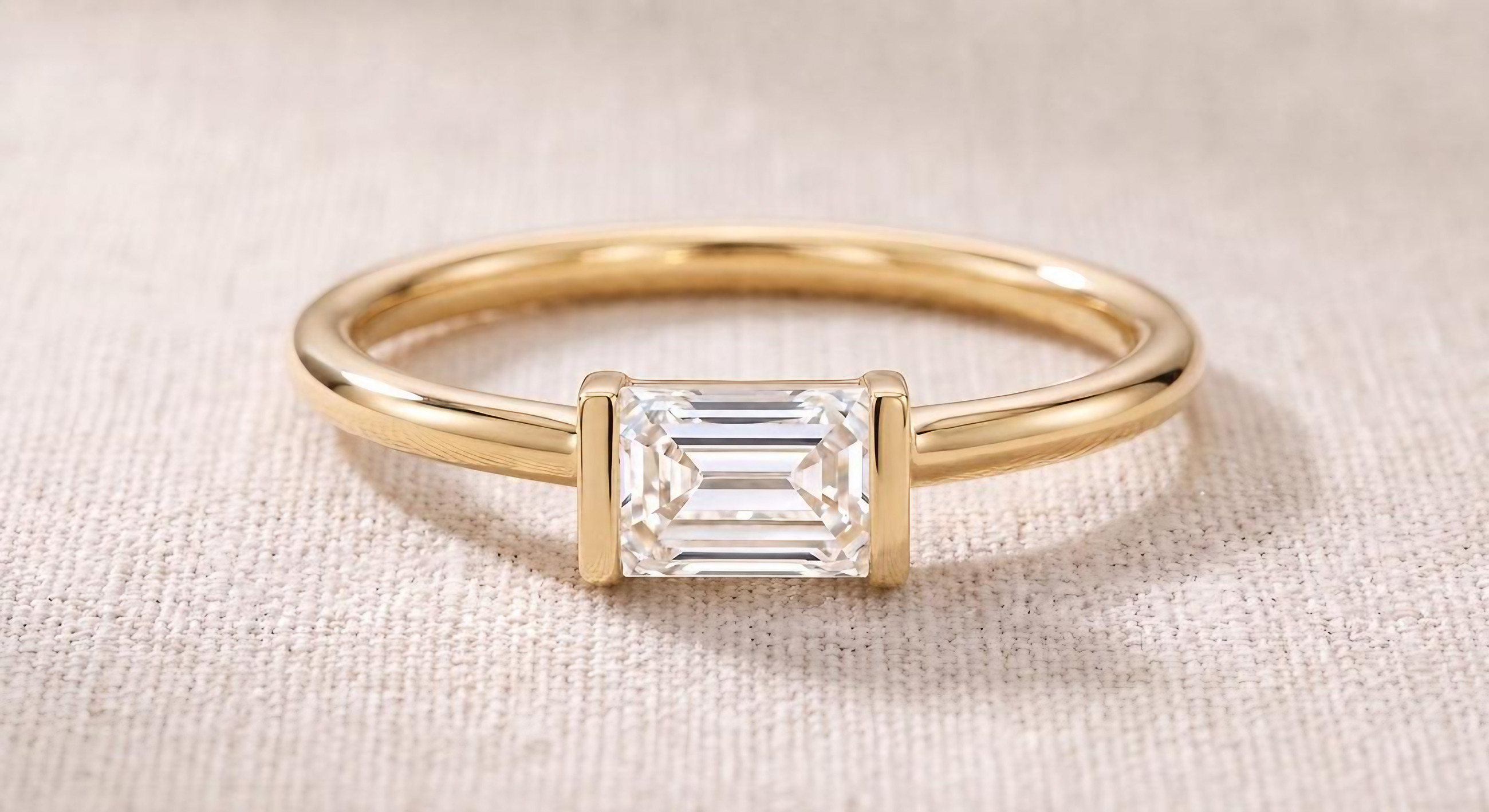
Change the setting so the emerald-cut diamond is held by two flat, vertical metal bars. There is no metal on the long sides of the stone, which are completely open. Keep the stone, band, metal, and background exactly the same. Do not change anything else in the image.
This time it worked, and the stone, band, and background stayed exactly as they were. Notice that the bars run the full height of each short end. Described this way, the setting still holds the stone securely, which is likely why the change finally went through.
Describe the setting the way you'd explain it to a bench jeweler. Instead of only naming it, say what shape the metal takes, where it sits, and where there should be no metal at all. Then say what must stay the same. If the AI still falls back on a familiar setting, check its image analysis to see how it's reading your design, or give it a clear reference photo of the setting you want.
Our final version reads closer to a bar setting than a classic two-prong. Whether that matches your intent is your call.
2. Gemstone color zoning and orientation
A bicolor tourmaline is beautiful precisely because of where its colors fall. No two stones are the same, and the way the color shifts across a stone is part of what makes it worth designing around. AI tends to smooth that character away, swapping your stone for a more typical version of it.
In our reference stone, soft pink covers about two-thirds of the stone, green fills the right third, and the transition between them is gradual and slightly diagonal.
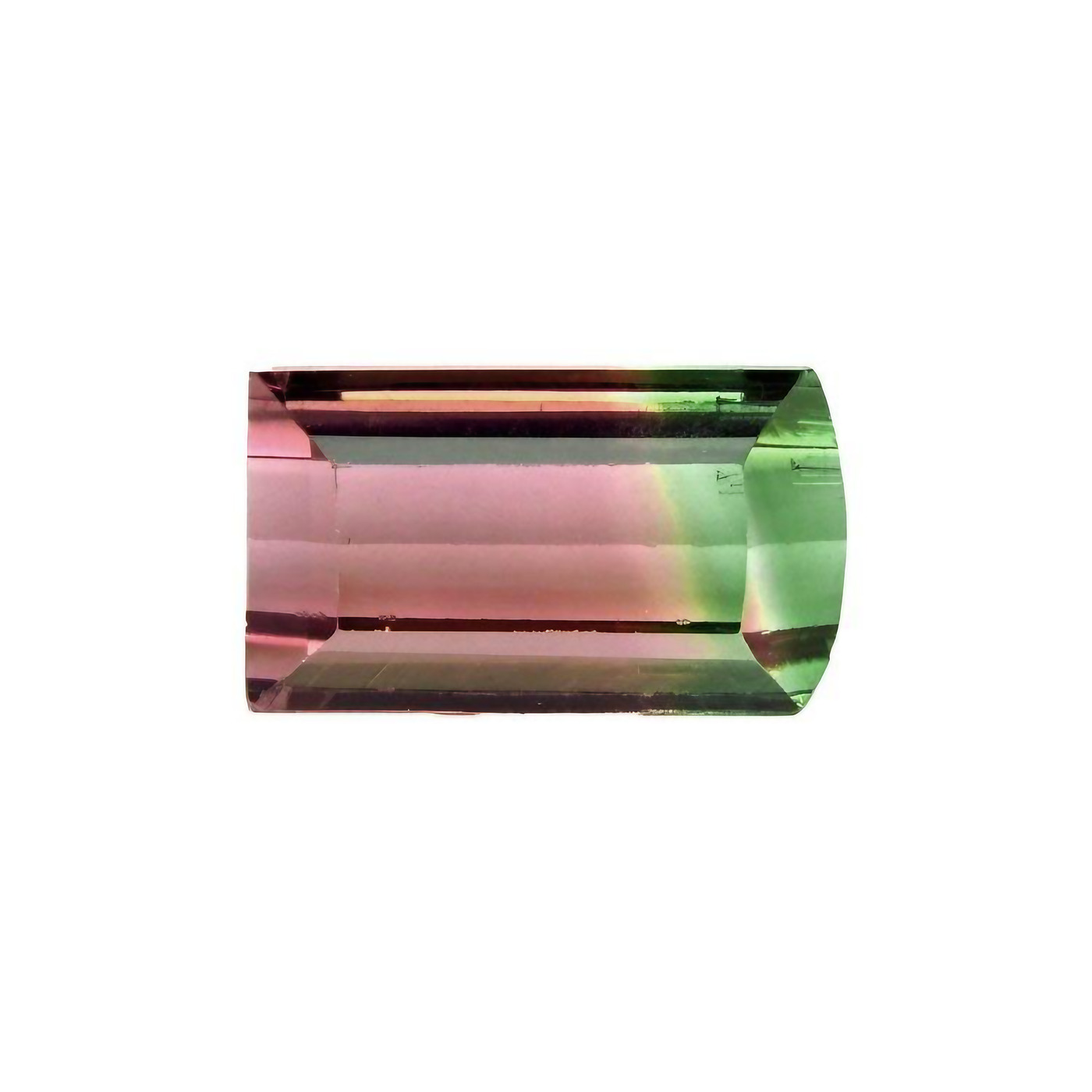
We set it into the ring from the previous example, along with a few other changes:
Change the center stone in image 1 to the tourmaline in image 2. Make the band thinner, add a row of small round pavé along the top of the band, and change the metal to rose gold.
At a glance, the result looks right. Look closer, and it isn't our stone. The colors split closer to half and half, the transition became a crisp vertical line, the pink turned more saturated, and the cut became a standard emerald cut with clipped corners. The bar setting we'd worked to get in the last example also turned into a full bezel, even though the prompt never mentioned it.
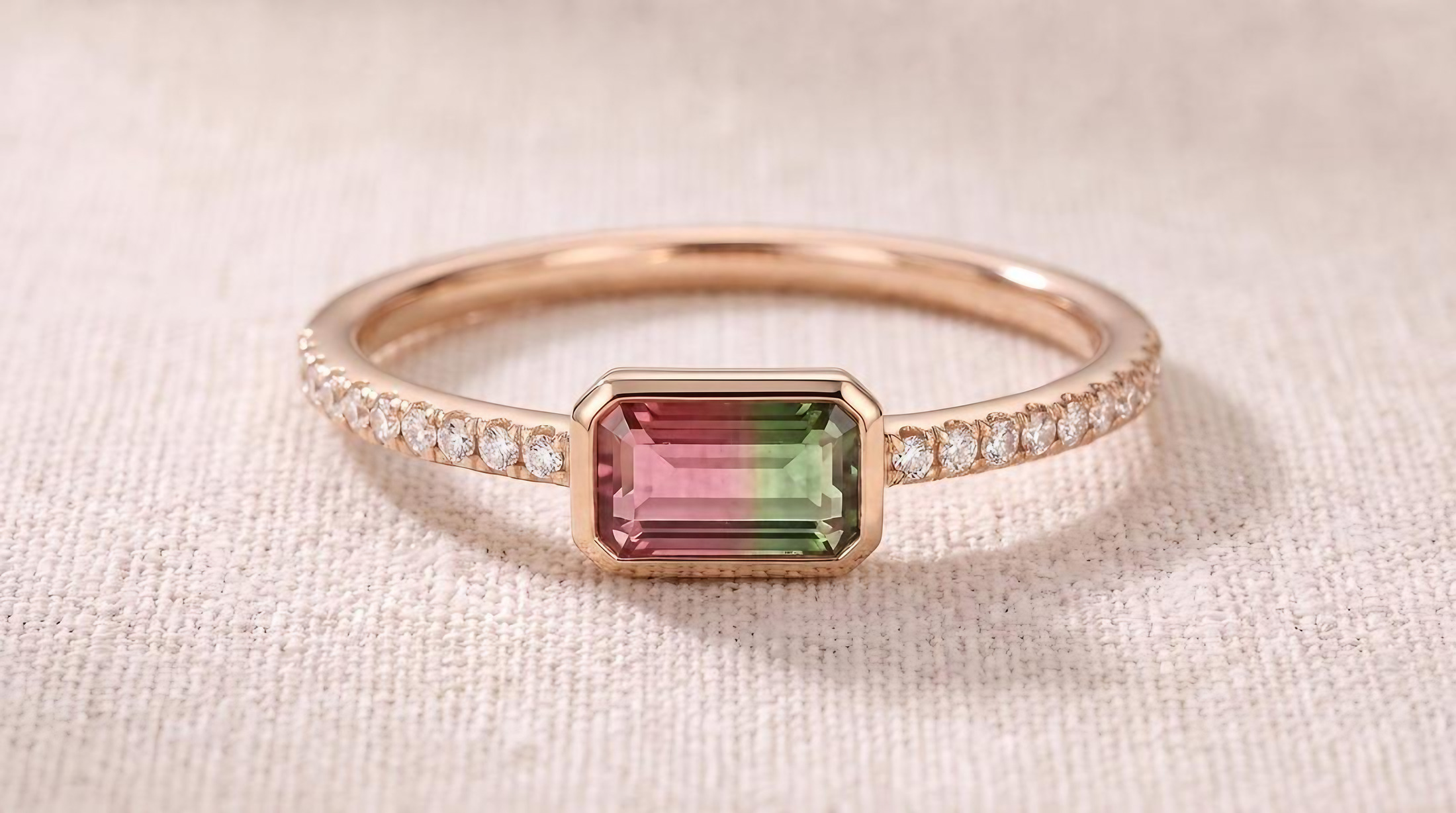
For the retry, we kept the same changes but were explicit about what made the stone ours and what had to stay:
Swap the stone in image 1 with the EXACT stone in image 2. Preserve the exact cut and color patterns and ALL details of the stone in image 2. Make the band thinner, add a row of small round pavé along the top of the band, and change the metal to rose gold. Keep the bar setting and background exactly the same. Do not change anything else in the image.
This time the stone came through much closer to the reference: pink across most of the stone, green on the right end, a softer transition, and a straight-cornered step cut. The bar setting held, and the band, pavé, and rose gold all landed as asked.
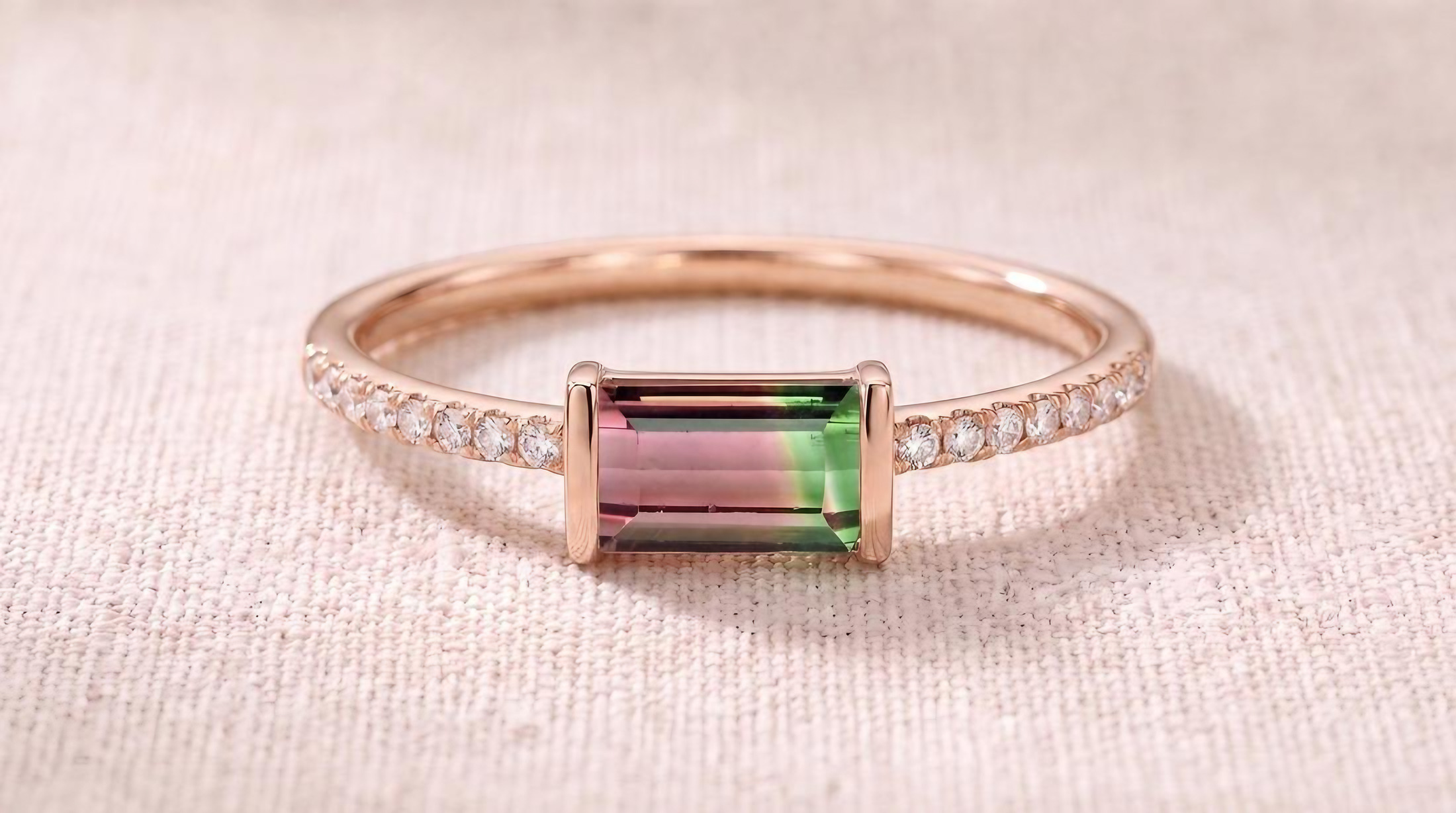
Start with the strongest stone reference you have, and tell the AI to preserve what makes that stone unique: its cut, its color pattern, and its details. Then name what's already approved, like the setting, so it doesn't get swept along with the other changes. For directional stones, state the orientation in plain terms, such as "pointed tip facing down." Even better, make one structural change at a time. In this example, that means swapping the stone in its own attempt, then thinning the band, then adding the pavé, with the metal change at the end. Each step gives the AI fewer competing instructions and gives you a chance to approve the result before anything else moves.
And compare every result against the stone itself, not your memory of it. Subtle differences in color and cut are easy to miss at a glance, and they're exactly what your client will notice.
3. Multi-view consistency
Ask for a front, side, and top view all at once, and the views often disagree. A stone shifts position, the band changes thickness between angles, or the AI blends two perspectives into one image. Each view looks plausible alone, but together they describe three slightly different rings.
Establish your primary view first and get it right. Then use the Generate Views flow in Facet Flow to build the other views one at a time, always try moving to the next closest angle: front to isometric, then isometric to side. Small steps give the AI less to guess about each time. Check each new view carefully before moving on. If it doesn't match, go back to the design and correct it there, rather than carrying the mistake into the next angle. Your approved primary view becomes the anchor every other view has to match.
4. Hidden construction
Hinges, clasps, earring backs, and the underside of a setting rarely appear in photos, so AI has little to learn from. Ask for a side view of a hinged huggie or an open bangle, and it will invent something. It may look convincing, but it often wouldn't open, close, or hold.
This is where your craft knowledge does the work. You know how a box clasp locks and how much clearance a hinge needs. Use AI for what it does well, which is showing the design's look and feel, and describe the mechanism directly in your technical notes or Technical Report. Your CAD designer and manufacturer will take it from there.
The pattern behind every workaround
None of these fixes is a trick. Each one depends on the designer bringing intent, references, and expertise. AI works best as an extension of your ideas, and the more you bring to it, the further it can take them.
Here's what that looks like with the same brief, written two ways:
“Design a nature-inspired pendant.”
“Design a pendant inspired by an unfurling fern: an 18k yellow gold frond curling into a spiral, with a hand-textured matte finish and a high-polish edge. Set small pear-cut tsavorites along the inner curve and a rose-cut diamond at the center of the coil. Organic and slightly asymmetric, about 25 mm tall.”
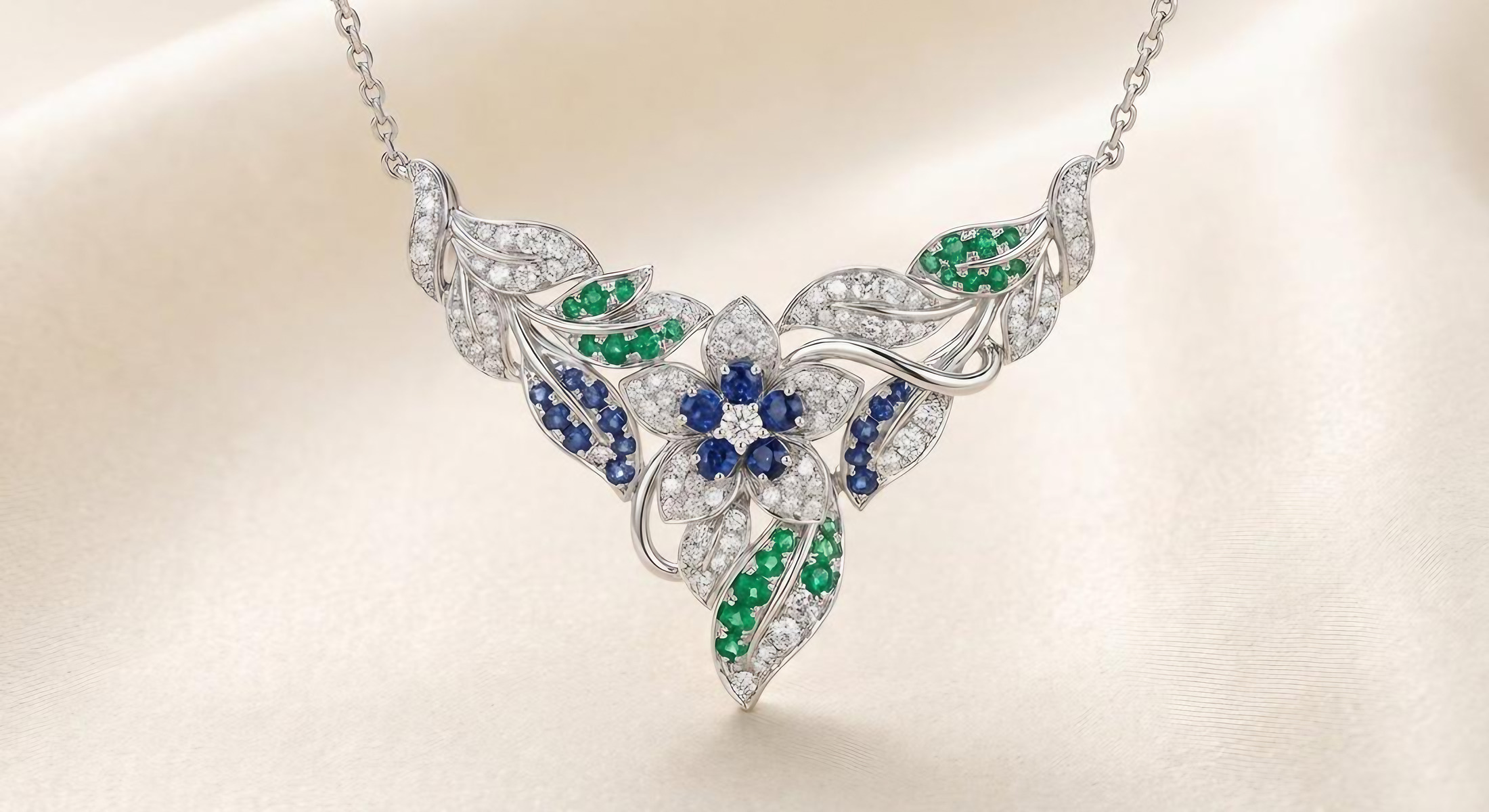
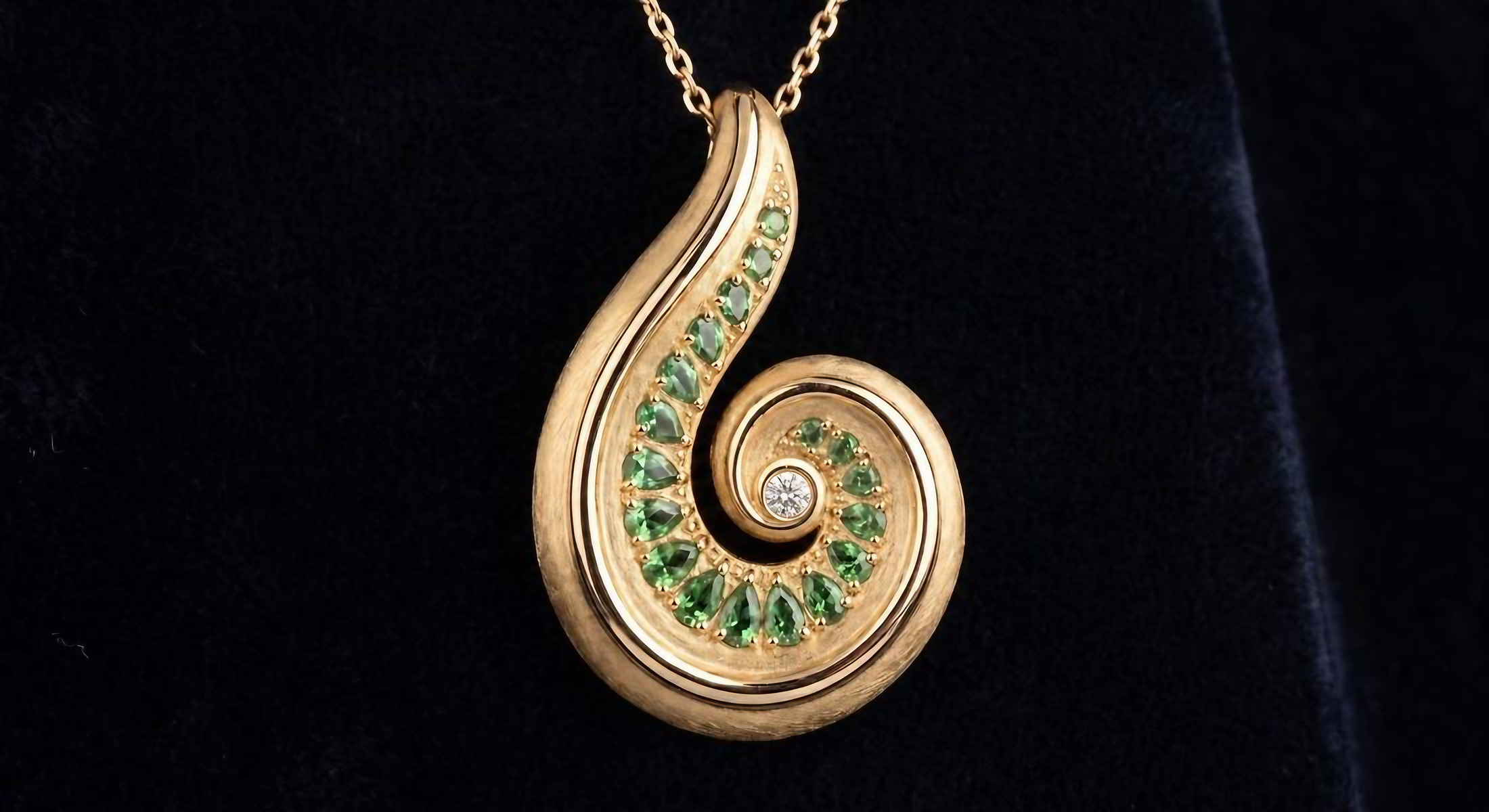
The vague prompt produced a beautiful piece, but it's the floral, gem-covered design AI reaches for when it has nothing else to go on. It could belong to anyone. The designer-led prompt produced the fern: the spiral, the textured gold against a polished edge, the tsavorites following the curve into a single diamond at the center. It looks like someone's design, because it is.
Figma's Dylan Field put it well in his Config keynote:
“AI has lowered the floor, it has not raised the ceiling. Designers, creatives, builders: You will raise the ceiling.”
Dylan Field, Co-founder and CEO, Figma · Figma's Config 2026 recap
Habits of a healthy workflow
A good relationship with AI comes down to a few simple habits:
- Start from your own direction. A sketch, a reference, or a clear written idea gives the AI something worth amplifying.
- Make one structural change at a time. Give stone swaps and structural edits their own steps, so the AI isn't juggling competing instructions.
- Say what must stay the same. Protect the details you've already approved.
- Review every output critically. Check the setting, the stone, and the proportions with a jeweler's eye before moving on.
- Know when to stop and decide. If a design starts drifting, go back to the last version you liked rather than pushing forward from a weaker one.
Your ideas, amplified
Used this way, AI doesn't flatten your style. It gives you room to explore more of your own ideas, test directions you might not have had time to sketch, and bring them to life for clients more vividly. The limitations are real, but so is the opportunity, and it belongs to the designers who bring the most to the table.
Human craft, amplified by AI. That's what we're building Facet Flow to support.